
Running a Web Server in a Private Subnet secured
Guide to running a Web Server in a Private Subnet with AWS CDK in Python.
On this page
The traditional way to run applications in Data Centres were to create a 3-tier architecture with:
- Web Tier: That would typically be placed in a DMZ (Demilitarized Zone) that allowed the server to be exposed to internet
- Application Tier & Database Tier: That would typically be placed behind firewalls that was not exposed to internet and required authentication
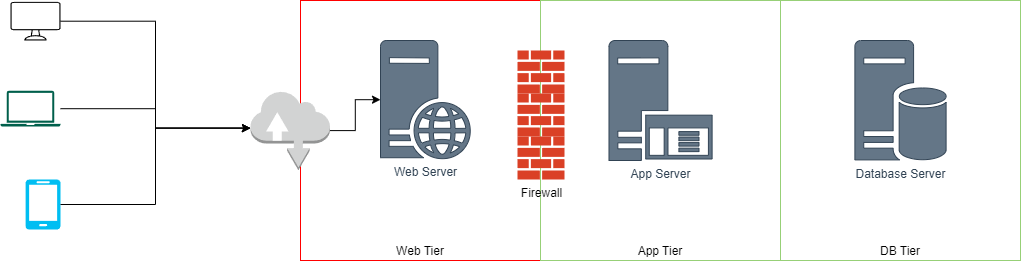
This was one of the weakest links in security posture of any organisation. However, with the advent of cloud, it did not need to be that way.
In this article, we will discuss a simplistic solution to this problem.
Modern 3-Tier Architecture
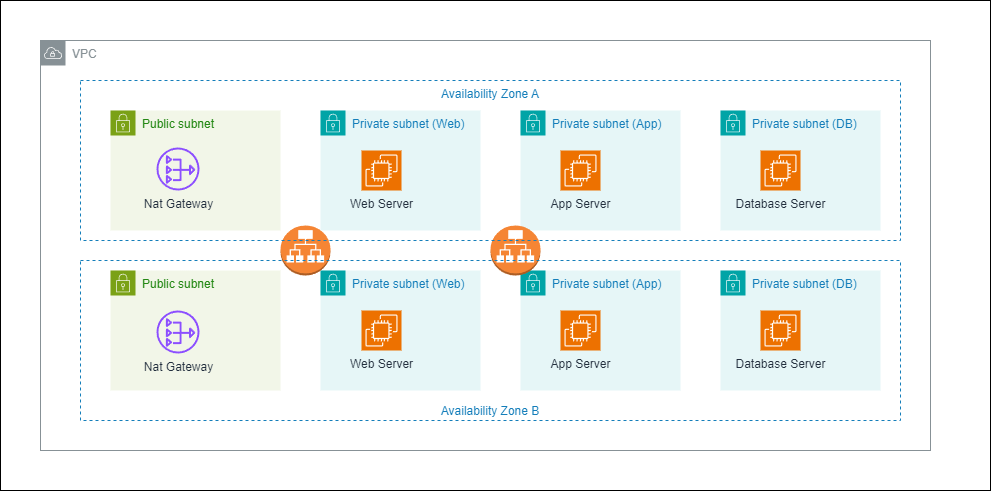
We overcome the traditional limitation by creating a 4-tier architecture with all the servers behind the “firewall” in private subnets fronted by a external facing load balancer. We use the public subnet to deploy NAT Gateways to allow the servers access to external services such as updates, security patches, APIs, etc.
In the below diagram, we have a VPC with 3 private subnets and a public subnet. The public subnet is fronted by a external facing load balancer. The private subnet is where the web server is running. The web server is not exposed to the internet, it doesn’t even have a public IP address.
Accessing the Web Server
- Web Traffic: The web traffic on ports 80 and 443 are routed through the load balancer, the load balancer acting like a reverse proxy, forwards the request to the web server in the private subnet. This avoids the need for the web server to have a public IP address.
- SSH Access: There are 3 ways we can have management access to the web server, in the order of security:
- SSH Key Pair: This is the most secure way to access the web server. We can use the SSH key pair to access the web server.
- SSH Agent Forwarding: This is a secure way to access the web server. We can use the SSH agent forwarding to access the web server.
- Bastion Host with SSH Forwarding: A separate bastion host in a public subnet can be used to allow SSH access to the web server where access can be limited to specific IP addresses.
The easiest of these is to use the bastion host in the public subnet to allow SSH access to the web server.
Scenario
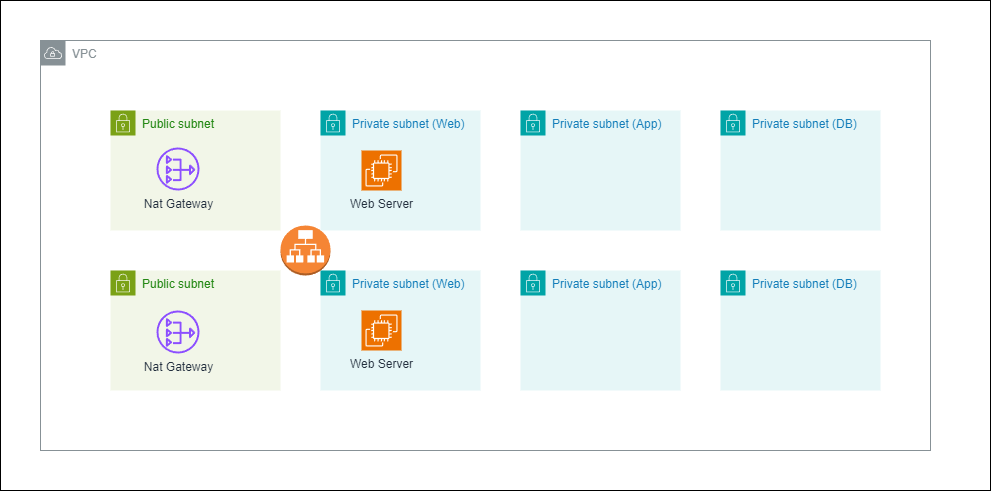
To simplify the demonstration, we will limit ourselves to the web-tier only. So if we are able to access the webserver from internet while the server is in a private subnet with no public IP address, we have achieved our goal.
Running the Web Server in a Private Subnet
1. Prerequisites
- Ensure that you have AWS CDK and SAM CLI installed.
- If needed create a new CDK application.
2. Create the VPC
First we create a 3-tier VPC with 2 private subnets and 1 isolated subnet. We can modify the approach from the previous article on how to create a 3-tier VPC with public, private and isolated subnets to create a VPC with 2 private subnets and 1 isolated subnet.
# filename: cdk_app/my_stack.py
from aws_cdk import (
    Stack,
    aws_ec2 as ec2,
)
from constructs import Construct


class MyStack(Stack):
    def __init__(self, scope: Construct, construct_id: str, **kwargs) -> None:
        super().__init__(scope, construct_id, **kwargs)

        # Define the VPC with three tiers
        vpc = ec2.Vpc(
            self,
            "MyDemoVPC",
            max_azs=2,  # Default is all AZs in the region
            subnet_configuration=[
                # 👇🏽 Public Subnets
                ec2.SubnetConfiguration(
                    name="Public",
                    subnet_type=ec2.SubnetType.PUBLIC,
                    cidr_mask=24,
                ),
                # 👇🏽 Private Subnets (Web Server)
                ec2.SubnetConfiguration(
                    name="Private",
                    subnet_type=ec2.SubnetType.PRIVATE_WITH_EGRESS,
                    cidr_mask=24,
                ),
                # 👇🏽 Private Subnets (App Tier)
                ec2.SubnetConfiguration(
                    name="Private",
                    subnet_type=ec2.SubnetType.PRIVATE_WITH_EGRESS,
                    cidr_mask=24,
                ),
                # 👇🏽 Isolated Subnets (Database Tier)
                ec2.SubnetConfiguration(
                    name="Isolated",
                    subnet_type=ec2.SubnetType.PRIVATE_ISOLATED,
                    cidr_mask=24,
                ),
            ],
        )
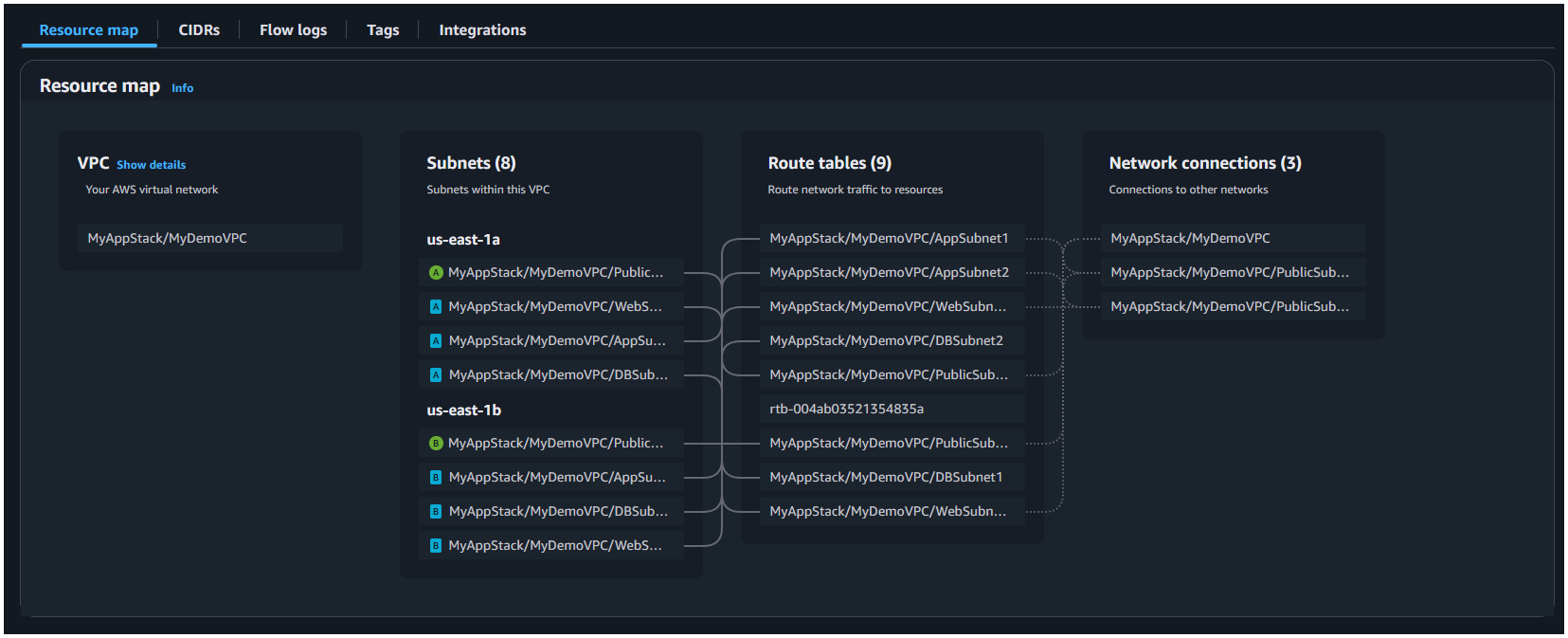
This will create the items in below resource map:
3. Create the Web Servers
We will create a web server in the private subnet. We will use the ec2.Instance class to create the web server.
# filename: cdk_app/my_stack.py
Need help?
Start a discussion on GitHub if you’ve got questions or improvements. Open discussions →
Series
AWS CDK
Related posts
Configure DynamoDB point-in-time recovery and deletion protection using AWS CDK
Create a DynamoDB table using AWS CDK in Python
Creating a 3-Tier Network Architecture VPC with AWS CDK in Python
Running Lambda Functions in a VPC with AWS CDK in Python
Using multiple environments AWS CLI and profiles with CDK